2026 · INTERNAL TOOLS | COMMUNICATIONS
Royal Courier Digest Builder
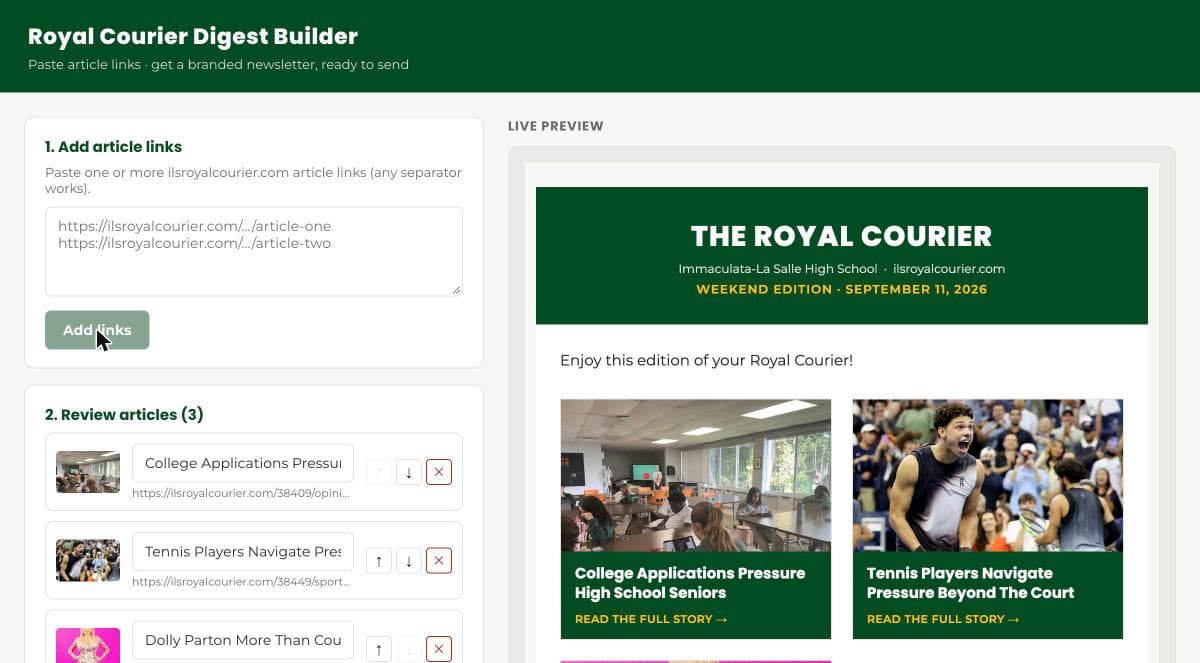
Turns a list of Royal Courier article links into a branded, ready-to-send newsletter, replacing a raw stack of Outlook link previews down one column.
Built at Immaculata-La Salle High School
Tech Stack
Overview
The Royal Courier media team building an edition used to stack raw Outlook link previews down a single column by hand. I built a tool where they paste one or more ilsroyalcourier.com links, and an Azure Function fetches each article server-side, reads its Open Graph tags, and returns a consistent preview with a server-cropped thumbnail. The team can edit titles, reorder articles, and set the edition label, date, and intro, with the ILS crest added automatically to the sign-off. It holds no data of its own: no sign-in, no database, and a host allowlist means it can never be used as an open URL-fetch proxy.
Impact
Who it serves: The Royal Courier media team producing the school's newsletter
Before
Building an edition meant stacking raw Outlook link previews down a single column by hand, with no consistent branding, no crest, and no control over how images cropped once pasted into an email.
After
The team pastes article links in, edits titles and ordering, and gets back a branded two-column edition with the ILS crest, ready to paste straight into Outlook or download as a standalone file.
Est. Annual Cost Saved
$179/yr
Estimate, not an audited figure. Methodology and sources are disclosed above for each comparable product.
What I Built
- Paste one or more ilsroyalcourier.com links; a server-side Open Graph fetch builds a consistent preview for each, enforced against a host allowlist so the fetcher can't become an open URL proxy
- Server-side 540x304 JPEG thumbnail cropping via sharp's attention/smart-crop strategy, sidestepping mail clients that ignore CSS object-fit and stretch images instead
- Edit titles, reorder articles, and set the edition label, date, and intro, with the ILS crest added automatically to the sign-off block
- Copy formatted email copies rich HTML straight into Outlook with formatting intact via the Clipboard API, or download a standalone HTML file instead
- Table-based, inline-styled markup built to survive Outlook's Word rendering engine, with a dark-mode CSS block that reaches Outlook.com/new Outlook, Gmail, and Apple/Android Mail
- No sign-in, no database: a stateless tool that holds no data of its own
What I Learned
Cropping thumbnails server-side sidesteps CSS object-fit entirely, since at least one mail client observed in testing ignores that property and stretches the raw image into the box instead.
Outlook's paste sanitizer strips <style> blocks, so the embedded dark-mode CSS only reliably survives in the downloaded standalone file, not a clipboard paste into a new message.
Classic Windows Outlook desktop ignores CSS media queries entirely and auto-inverts colors instead, which is part of why the branding bars stay a fixed dark green/gold rather than trying to author against a media query it won't read anyway.